Tuesday, February 27, 2018

The Nokia 8 undergoes a rigorous 40-stage process of machining


The Nokia 8 undergoes a rigorous 40-stage process of machining, anodizing and polishing to ensure its distinctive design pairs flawlessly with the polished aluminium unibody. The ultimate in seamless unibody construction, Nokia 8 is designed to nestle perfectly in the palm of your hand.


                                                         NOKIA IN ACTION


The cameras


Introducing Dual-Sight mode


Share the moment in the moment with built-in streaming straight to Facebook Live™ and YouTube Live. Your creations are one touch away from the world.


Super-slim cameras
with ZEISS optics


Audio and video
Hollywood technology in the palm of your hand
For immersive video capture and a playback experience to match, the Nokia 8 is the first ever phone to feature Nokia OZO spatial 360° audio built in to its core. Capture moments with tech used by Hollywood filmmakers and music producers, then relive them as if you never left.


The hardware
Our most powerful Android™ smartphone
To maximize performance, Nokia 8 is built upon the cutting-edge Qualcomm® Snapdragon™ 835 Mobile Platform, engineered to deliver exceptionally long battery life. We’ve also added a full-length copper cooling pipe with graphite shield to dissipate system heat across the full body of the phone.


The software
Pure, secure and up to date
Nokia 8 comes with Android Oreo 8.0.0, packed with the full spread of Google's most popular apps and no unnecessary extras. Plus, we’ll make sure you keep getting regular updates to help you stay on top of features and security.

Unlimited storage with Google Photos
Capture every moment and never run out of space with free unlimited high quality storage from Google Photos.3Automatically organized and searchable by the places and things in them, your memories are always easy to find and share.

Google Assistant, always ready to help
From managing tasks and planning your day to controlling your favourite apps and smart home devices, Google Assistant is ready to help wherever you are.


The details

Nokia 8


Outside
  • Precision machined from a single block of 6000 series aluminum
  • Polished mirror finish
  • 13 MP front and rear cameras with ZEISS optics
  • Bright 5.3” 2K polarized display, protected by sculpted Corning® Gorilla® Glass 5


Inside
  • Pure, secure and up-to-date Android Oreo with regular updates
  • Qualcomm® Snapdragon™ 835 Mobile Platform designed for excellent battery life and improved superior graphics performance
  • Nokia OZO spatial 360° audio
  • 4 GB of RAM
  • Loads of space with 64 GB mass storage¹ and MicroSD card support up to 256 GB


Full specifications

In the box
Your Nokia 8
Charger
Charging/data cable
Headset
Quick guide
SIM door key
Design
Size 151.5mm x 73.7mm x 7.9mm
Colors Polished Blue, Tempered Blue, Steel, Polished Copper


Network and connectivity
Network speed LTE Cat. 9, 3CA, 450Mbps DL/50Mbps UL
802.11 a/b/g/n/ac (MIMO), BT 5.0, GPS/AGPS+GLONASS+BDS, NFC (sharing) ANT+
Performance
Operating system Android™ Oreo
RAM 4 GB LPPDDR4X
CPU Qualcomm® Snapdragon™ 835 Mobile Platform, Octa core, (4* 2.5GHz Qualcomm® Kryo™ CPU + 4* 1.8GHz Kryo)


Storage
Internal memory 64 GB1 UFS2.1
MicroSD card slot Up to 256 GB
Audio
Connector 3.5mm AHJ headphone jack
3-mics
Display
Size and type 5.3” IPS QHD
Resolution 2560 x 1440
Material Corning® Gorilla® Glass 5, 2.5D Glass
Camera and flash
Primary camera 13 MP (Colour + OIS) + 13 MP (Mono), 1.12um, f/2.0, 76.9˚, PDAF, IR range finder, dual tone flash
Front-facing camera 13 MP PDAF, 1.12um, f/2.0,  78.4˚, display flash
Connectivity and sensors
Connectivity Type C, USB3.1 Gen 1 (5Gbps)
Sensors Ambient light sensor, Proximity sensor, Accelerometer, E-compass, Gyroscope, Fingerprint Sensor, Hall sensor, Barometer
SIM slot 1 nano-SIM slot + 1 nano-SIM or 1 MicroSD card slot
Battery and charging
Battery type 3090mAh2, non-removable
Others
Splashproof (IP54)

Friday, March 25, 2016

Hulu Embraces Virtual Reality With New Gear VR App

gear-vr-new

Hulu promised last year that it would release an app for Gear VR. It was expected that the app would arrive before the end of the year in 2015 but instead, Hulu has released its virtual reality today, almost three months into the new year. Hulu says that this is the first app of the several that it will create for different platforms.
The Hulu app for Gear VR provides users with access to the entire 2D Hulu library in a 360 degree environment. There’s a collection of VR content as well, including one original title, which will provide a truly immersive experience to users.
There are over 25 VR titles available on Hulu currently from the likes of Spoke, Studio Transcendent, Viacom, Showtime, Discovery, The National Geographic Channel and more. The 3D VR content will be open to all app users even if they’re not paying for a Hulu subscription.
Hulu’s first VR app only works on the Gear VR, a virtual reality headset that’s only compatible with the Galaxy S7 and the Galaxy S7 Edge, Galaxy Note 5, Galaxy S6Edge+, Galaxy S6 Edge and the Galaxy S6. Hulu promises to release more VR films, shorts and environments on a regular basis.
“We are super excited about our first steps into VR,” says Hulu.

Apple Designing Own Secure Servers To Avoid Snooping

apple-logo3

According to a new report, for years, Apple has been trying to develop an internal solution to handle the sheer amount of data that it requires to keep services like iTunes, iMessage, Apple Music and the App Store up and running smoothly. It’s said that the company continues to work to achieve this goal and that it’s also designing its own secure servers to avoid the possibility of snooping.
The report from The Information claims that Apple is aware of the fact that third-party and off-the-shelf hardware can be compromised to allow hackers or even government agencies to access data.
Apparently the company has become so paranoid about its data being snooped on that it has started to take photographs of motherboards and assigning labels to each chip’s function so if a board turns up with an additional chip that wasn’t in the original design it will immediately know that something is out of place.
Apple can really only have complete peace of mind when it developers the entire secure hardware and software system itself, that includes designing and manufacturing chips and boards itself so as to reduce its reliance on companies like Google, Microsoft, and Amazon who have robust cloud solutions.
Time and again Apple has reiterated its commitment to user privacy and its fight against the FBI was largely based on the premise that the company couldn’t set a precedent in which it creates a backdoor for its own device to allow the government to take data from a locked device.

Thursday, March 24, 2016

OnePlus 10000 MAh Powerbank Is Charged Up For Launch This

ONEPLUS

OnePlus 10000 MAh Powerbank Is Charged Up For Launch This Week!

OnePlus 10000 mAh Powerbank is charged up for launch thisweek!


OnePlus is bringing its design finesse to its first-ever portable powerbank charger for smartphones. The company has been teasing its accessory for quite some time now and the curtains are expected to be taken down later this week when the product goes out for sale. The charger is said to be capable of charging the OnePlus One smartphone three times on single charge and with a 10,000 mAh battery unit in tow, it's hardly surprising to see the charger's prowess.

The wait has been a long one but not anymore as, from March 17 onwards the OnePlus charger will be available for buyers priced at tad lower than $15 mark (Rs 930 approx), thereby giving Xiaomi's Mi Powerbank, the right kind of heat. It will be available on OnePlus page but it remains to be seen whether OnePlus opts for a flash-sales model or let it sell on the open.


OnePlus powerbank comes in Sandstone Black/ Silver White colors that are already prominent with the One smartphone. It packs a 10,000 mAh battery as we mentioned earlier which can charge up OnePlus One three times with single charge. The unit takes over 5 hours to charge up fully but manages to offer you the rough-and-tough usage scenario. Chargers don't come thin but with a 16.2-mm figurine and 220 grams weight for its capacity (at this price) there's not much to claim about this One as well.

We expect the charger to reach Indian shores in the coming week, to be sold via Amazon in all probability. We're not certain as to how much OnePlus might ask for the charger in the country but surely it can't be more than Rs 1100 this way consumer has alternatives to look for except for the Xiaomi Mi Powerbank.

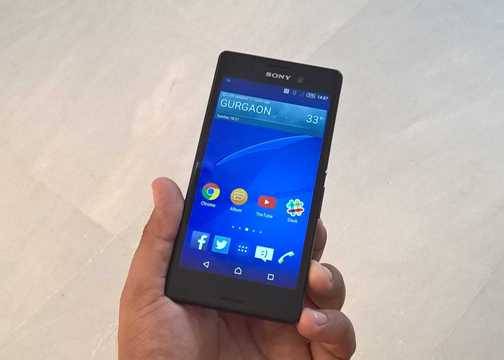
Sony Xperia Cosmos With A 5MP Front Camera And LED Flash Poses For Pictures


Last year, Sony claimed that it was reducing dependency on mid-range devices and will focus more on the high end market segment. However, this doesn't necessarily mean that the company would bow away from the midrange market altogether, as a new leak clearly suggests.

The company's new Xperia Cosmos handset has been leaked out which reveals a selfie friendly camera on the front. There's even an LED flash accompanying the sensor, which is in line with the current trend.
The smartphone is said to be running on a MediaTek MT6752 octa core SoC and will seemingly run Android 5.0 Lollipop out of the box.
It has all the markings of a Sony smartphone with a familiar UI and the easy to access power button on the right. The rounded corners are perhaps the only new feature with this device, as the handset appears to be pretty identical to every Sony midrange handset we've seen of late.
Unfortunately, other hardware specs of the smartphone have still not been revealed by the source, but we expect to learn more in due time. Sony recently unveiled the Xperia Z4 Tablet and the Xperia M4 Aqua smartphone at the MWC, so the arrival of yet another midrange handset this early in the day might seem a little too ambitious.
However, given the horrid time Sony has had in the mobile industry over the past couple of years, nothing can be ruled out. HTC recently launched a smartphone similar to this known as the Desire Eye. However, it had a slightly superior hardware specs sheet, so the two might not be the in the same league. 

Xiaomi Mi Pad: Tablets Aren't As Hot As They Were Before

XIAOMI

Xiaomi Mi Pad: Tablets Aren't As Hot As They Were Before


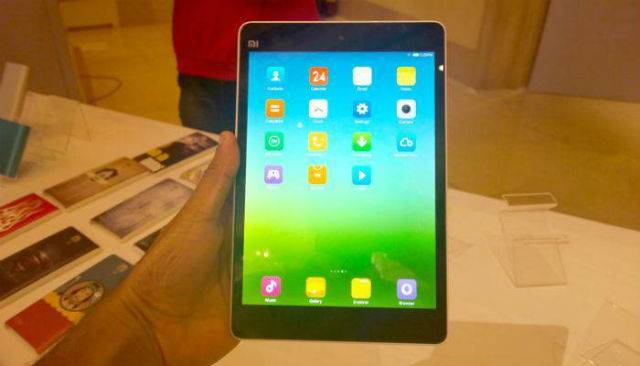
Out of nowhere, Xiaomi decided to throw the Mi Pad tablet in India and without much ado, everyone was raving about the prospect of having a iPad Mini lookalike for Rs 12,999 . We must admit, at this price, this looks like an enticing proposition. Having said that, does anyone really want a tablet these days? Well, Xiaomi seems to think so but the market dynamics may be speaking on the contrary.

Recent report figures indicate the growing conundrum of having a tablet and instead people opting for phones with bigger display (aka phablet). Xiaomi's Mi Pad is an aged product which needs refreshing very soon but biding their time with phones, the company decided to wait for the right time to bring its slate to India.

So, is this the right time for Xiaomi to introduce Mi Pad for buyers? Don't get us wrong, for the price Xiaomi Mi Pad is an excellent option with high-quality features (and hardware) all across the sphere. No other brand has managed to pack in so much features in the segment and Xiaomi, clearly has the upper hand yet again.


Having said that Xiaomi might reawaken the demand for tablets in the country; making it a viable form device all over again. We won't have to wait long to know if Xiaomi has cracked the tablet code or failed to live up to its billing.

The tablet goes on sale in the coming weeks and without registration, and we shall be posting a full review of it soon, so stay tuned for that.

Google's New Chromebook Pixel: Dangerously Close To Buyable


google chromebook pixel 2015 left vs pixel 2013 rightIMAGE: ROB SCHULTZ
Compared side by side, the 2015 (left) and 2013 (right) Chromebook pixels look almost identical. The 2015 model is slightly lighter and thinner. 

Google's New Chromebook Pixel: Dangerously Close To Buyable

The laptop you’re about to see is as much an idea as it is a machine. Google’s new Chromebook Pixel is designed to be the world’s best Chromebook—and it is, without even trying hard, by a yawning margin. That’s the machine part.
Now for the idea part. Two years ago, when Google introduced the original Chromebook Pixel, you could argue it was too early. Chrome OS was young. There wasn’t enough to do with all the processing power, and with an early-gen mobile CPU, battery life was disappointing. It was all dressed up with nowhere to go, and it was also crazy-expensive, with a base price of $1299 and a higher-end model that cost $1449.


Also, people looked at the Chromebook Pixel and asked, “Why build such a powerful laptop ‘just’ to run browser-based applications?” But they were asking the wrong question. Google made the Chromebook Pixel—the old one and the new one—to answer a different question: “Why not?”
Why not have a flagship for the fledgling Chrome OS that can stand with the best from Apple or any major PC vendor? Whether you thought the Pixel was awesome or ridiculous, Google was simply expressing its ambition to compete head-on with those two platforms.
The new Chromebook Pixel starts at $999 and has an “LS” model with a faster CPU for $1299. It’s still expensive—just a little less than before. But if the new 12-inch MacBookcan get 4-out-of-5 stars for pedestrian performance and a tyrannical, single USB-C port, the Chromebook Pixel must earn more than that for delivering significantly better speed and battery life than its predecessor, plus significantly more generous and versatile connectivity.
It can hold its head up among the flagships of other platforms for beauty and features. Oh, and it’s the best Chromebook available by far, as I’m about to show you.

Built to be the best

google chromebook pixel hinge medIMAGE: GOOGLE
The Pixel’s exterior is both luxurious and strong, with subtle finish to the aluminum chassis and a piano-style hinge. 
Let’s be honest: It’s not hard to be the best Chromebook when the market remains largely one of small, inexpensive, underpowered machines. But the masses clearly don’t mind, because Chromebooks were the top sellers among laptops during the last holiday season, and they’re big in education, too.
The Pixel, by contrast, exudes excellence, starting with its aluminum chassis whose subtle texture almost feels soft. Google paid attention to details, giving the Pixel crisply tailored edges and an extremely sturdy hinge.
google chromebook pixel lightbar croppedGOOGLE
The lightbar on the lid of the Google Chromebook Pixel glows rainbow colors when it opens and closes, and it also shows battery capacity as a green or yellow bar.
A slender LED lightbar near the edge of the lid flashes Google’s rainbow colors and also shows battery life. Compared to its predecessor, this new Pixel is slightly lighter than before (3.3 pounds compared to 3.35 pounds) and even a scant millimeter thinner (15.3 compared to 16.2).
On the sides, you’ll find a lot more connectivity than we’ve seen on some other new models lately (*cough* MacBook *cough*), including right and left USB-C ports. The ports can be used with the included power adapter from either side—a nice convenience. Google sells a bunch of USB-C adapters: USB-C to HDMI ($40), DisplayPort ($40), or USB-A (adapter or cable, both $13). The new Pixel also has two USB 3.1 ports, an SD card slot, and an audio jack.
google chromebook pixel 2015 left sideIMAGE: ROB S
Google’s new Chromebook Pixel for 2015 has two USB 3.1 ports and an audio jack on its left side, plus a USB-C port for power and other connectivity.
Open the Pixel, and there it is: That gorgeous, 12.85-inch touchscreen display with a 2560x1700-pixel resolution and 400-nit brightness. Take that, Retina. Of the machines we’ve seen, only Dell’s XPS 13 has better bragging rights, with its 3200x1800 display option.
According to Google, the new Pixel’s display has a wider color gamut. We set the same wallpaper and same display settings on both Pixels, and you can see that the new Pixel (at right in the photo) has richer colors. Just look at the richer blue details in the surf and sky, and the red-tinted crags on the sandy cliff.
google chromebook pixel display comparo old vs new angleMELISSA RIOFRIO
The original Google Chromebook Pixel (left) and the second-generation model (right) have the same screen resolution, but the newer model has a broader color gamut, subtly visible in this side-by-side comparison.
The full-size, island-style keyboard is firm without being harsh (I’ve banged on a lot of crappy Chromebook keyboards, so believe me, I know). The trackpad on the Pixel is bigger, and it’s also supposed to be more responsive than its predecessor. I enjoyed using both for long periods.
Like I said, it wasn’t hard for this to be the best-designed Chromebook. But it’s also hard to find a feature set this great on any other premium laptop.

No Like

This is not a super portable laptop. At over three pounds, the Chromebook Pixel feels pretty damn heavy. This is no razor-thin MacBook.
It only runs Chrome! When you're looking at a $200-$400 machine, it's easy to see that as a trade-off or a compromise (although less so than ever with things like HP's lovely little Stream laptop). But when you're buying a $1,000 laptop with great specs, it's just a choice. A limiting choice, with no upsides beyond access to this primo machine.

Should You Buy It

No. But I mean like, maaaaaaaaaaaybe? Nah. But then again...
As wildly premium as it is (in the greater world of Chromebooks) the Pixel is designed to raise a big question: Is a browser enough? Is it time to pay $1,000 for a browser machine? Has ChromeOS grown up enough that it's not just a budget option? If you put a gun to my head, I'd say the answer is still no, but it's a tougher call than it's ever been before. The $1,300 original Pixel was sort of laughable. This $1,000 second-gen? Waaaay less so. Especially with a battery life that flirts with lasting all day, this is a near perfect machine for web-workers, and professional internet-surfers (like myself).
For a purely web-browsing and typing machine, the Chromebook Pixel is one of the best out there and certainly one of the best designed. The bulky function-over-form approach makes it an interesting and attractive counterpart to something like the slim new MacBook-which opts for a more powerful operating system, but a chip that could ultimately leave it less capable.
Still, Google's still got a bit of a ways to go to prove that Chrome-something that already lives on every other laptop out there-is worth picking to the exclusion of something like Windows or OS X. For now, it's still not. But if you were keen to buy a new Chromebook Pixel anyway, I wouldn't try to talk you out of it.
This flagship premium Chromebook has come a long way from its fantastic-but-laughable beginnings. If ChromeOS had a killer app, some killer exclusive feature, the Pixel could become a really solid choice for everyone.

Friday, May 29, 2015

Our Favorite Android, IOS, And Windows Phone Apps Of The Week

Our Favorite Android, iOS, and Windows Phone Apps of the WeekANDROID

Our Favorite Android, IOS, And Windows Phone Apps Of The Week

This week is the big annual tech holiday for Android fans (with Google Photos as a present), and Apple enthusiasts big day isn't far behind, but we still got some great apps to talk about amidst the big headlines concerning new OS features and the like. Android gets completely caught up in the world of livestreaming, iOS gets some new and weird ways to communicate, and a Microsoft gimmick feature turns into a gimmick app.
Read up.

Android

Periscope

Our Favorite Android, iOS, and Windows Phone Apps of the Week
You've most likely heard all about this little app. Currently the top-dog in the world of livestreaming, Twitter's Periscope lets you drop in on anyone's livestreaming life to see what they're doing. Unlike Meerkat, which was given the cold shoulder days before Twitter's livestreaming app when live on iOS, you can tap into Twitter followers and watch their feeds. It's an app worth having in your app drawer, so pick it up now (if you haven't already). [Free]

Mistaken

Our Favorite Android, iOS, and Windows Phone Apps of the Week
This app is so great because it's so weird. Take, for instance, this cryptic message: "You will take a photo/Your photo will be shown to as few people as possible/You will never see your photo again/You might see someone else's photo. You will only see it once." That is the entire premise, and it's pretty great. Take a photo, send it off, and get one back. Prepare for a lot of uninteresting selections and probably a few genital shots (maybe). But it's all about the thrill. [Free]

Office Lens

There are a lot of apps out there that can turn paper into digital perfection. Scannable is a good go-to for iOS, but Microsoft's Office Lens app-previously exclusive to Windows Phone-is now out of beta and available to everyone on Android and iPhone. What makes Office Lens so great is that it helps get rid of all the paper clutter in your life and also as a way to take notes at meetings or classes by just snapping a picture. It automatically trims and clones the image and converts to a word doc that you can even edit. It can even be turned into a searchable PDF. Yes, this is great. [Free - also available on iTunes]

iOS

Korg iM1

Our Favorite Android, iOS, and Windows Phone Apps of the Week
I appreciate anything that can make music look like complicated math, but the iPad-only Korg iM1 brings one of the most iconic Korg synths to tablets. This music workstation debuted back in 1988 and the app comes with over 33,000 sounds and can even been used as a MIDI module. It's the perfect music-making sidekick but it comes with a price, which is luckily cut in half for a limited time. [$20]

TimePage

Our Favorite Android, iOS, and Windows Phone Apps of the Week
Moleskine, makers of those nice and overly expensive notebooks, are getting into the app game, and its software specialty is pretty obvious-calendars. TimePage comes with an iOS and Apple Watch app that can sync across iCloud, Google, and Exchange so that your calendar is always right there when you need it on whatever platform. When you plan events in another city, you get weather and travel times and the app also keeps empty dates populated with fun information like "This Day in History." The app will cost you a bit, but if you're a fan of Moleskine's approach to design, you'll feel right at home. [$5]

Pext

Our Favorite Android, iOS, and Windows Phone Apps of the Week
I went through a brief phase where I texted all my friends in memes. The "It's Something" meme was always a personal favorite. I may have cooled on the whole idea, but the internet hasn't and that's why Pext exists. Type in a text message and put in a hashtag describing what the image should be. Then, your text is turned into appropriate memespeak. Is it the way you'll want to communicate with your boss or your parents? Maybe not, but could be great for that certain friend. Hey, It's Something! [Free]

MimeChat

Our Favorite Android, iOS, and Windows Phone Apps of the Week
But if you need yet another way to communicate with that certain bestie in your life, then there's also MimeChat. This app is like normal messaging for the most part, but you can type in certain commands in between colons and two tiny avatars will act out what you've typed. I wonder if :fuck you: does anything interesting. [Free]

Windows Phone

Microsoft How-Old

Our Favorite Android, iOS, and Windows Phone Apps of the Week
Remember that nifty little How Old feature that people were messing around with a few weeks back? Well, it's now a Windows Phone app because why not. It works exactly the same way. Upload a photo and Microsoft will guess the apps of the people in the photo (most likely incorrectly). It'll probably give you about a day of passing fun until its novelty wears off. But hey, at least it's free. [Free]

Happn

Our Favorite Android, iOS, and Windows Phone Apps of the Week
Despite massive popularity, dating apps such as Tinder have yet to make official dating clients for Windows Phone, but there are other options out there if you're into the dating app game. Happn takes a slightly different spin on the whole idea. Yes, it still uses the familiar swipe left/swipe right form of dating selection but it only pulls from profiles that are very close to where you are-and even points out where your paths crossed. When you think about the data it needs to pull in to make this app magic happen, it's a little creepy. But if you're not afraid, why not go for it. [Free]